
Packaging Guides
How to design custom nutritional labels for growing food brands
Cubit Team
July 8, 2026
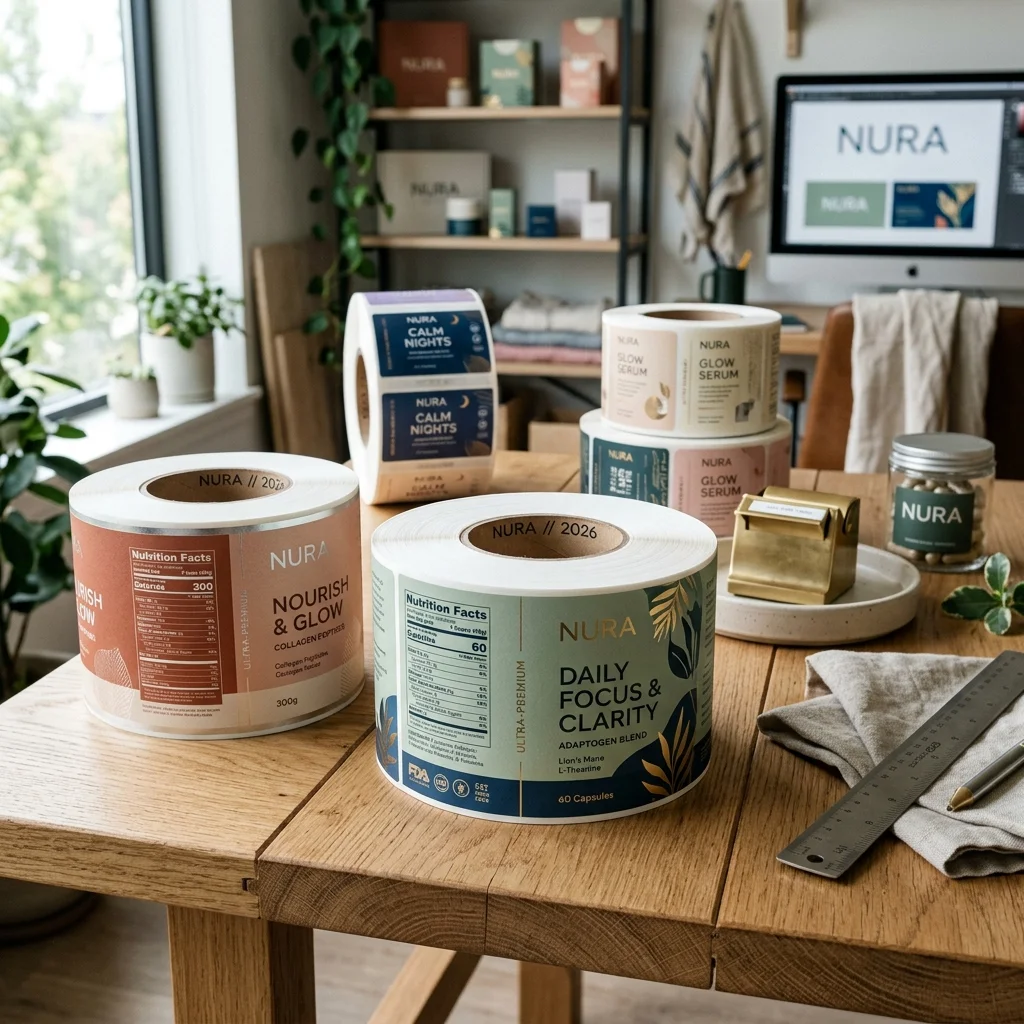
Designing custom nutritional labels requires balancing strict legal guidelines with your brand visual identity. According to FDA regulations, any packaged food product sold in the United States must carry a Nutrition Facts label that accurately displays serving sizes, calorie counts, and nutrient values. Failing to comply with these formatting rules can lead to product recalls, which cost food brands an average of $10 million in direct expenses and lost sales. For growing brands, getting these labels right the first time is a practical necessity for retail distribution.
To meet regulatory standards, food businesses must use specific font styles, line weights, and spacing parameters defined by the government. At the same time, the label must adhere to your product packaging, withstand refrigeration or moisture, and fit your production budget. Navigating these requirements involves understanding both the legal landscape of food labeling and the technical aspects of modern packaging design.
In this guide:
The Food and Drug Administration (FDA) updated its Nutrition Facts label design requirements to reflect newer scientific data, marking the first major redesign in over two decades. The current format forces manufacturers to display critical health data more prominently. For instance, the calorie count must be printed in a bold typeface that is at least 16 points in size, while the serving size statement must be at least 9 points and bolded.
Under these rules, brands must also declare the actual amount of vitamin D, calcium, iron, and potassium in micrograms or milligrams, rather than just listing daily values. If your package contains between one and two servings, such as a 20-ounce soda or a 15-ounce can of soup, you must label the item as a single serving because people typically consume the entire container in one sitting. For larger packages that can be consumed in one sitting or multiple sittings, you must provide a dual-column label showing calories and nutrients on both a per-serving and per-package basis.
Working within these parameters is not optional if you plan to sell on major retail shelves. Distributors and retail buyers routinely inspect product packaging during onboarding. If your custom product boxes or bottle labels do not comply with the 2016 FDA labeling regulations, retailers will reject your inventory, delaying your market entry by weeks or months.
A label cannot do its job if it peels, fades, or tears before the customer opens the product. The material you select depends entirely on your product storage conditions, usage environment, and container shape. Standard paper labels work well for dry goods stored on ambient pantry shelves, but they disintegrate quickly when exposed to moisture, oils, or low temperatures.
For products that require refrigeration or face wet environments, plastic films like biaxially-oriented polypropylene (BOPP) are the industry standard. BOPP is highly resistant to water, oil, and chemicals, making it ideal for salad dressings, cold-brew coffees, and frozen meals. You can choose between clear, white, or metallic BOPP depending on your container design and visual goals.
| Label material | Best for | Moisture resistance | Temperature range | Relative cost |
|---|---|---|---|---|
| Semi-gloss paper | Dry pantry goods, cardboard boxes | Low | 32°F to 150°F | Low |
| White BOPP (plastic) | Refrigerated items, bath products, squeeze bottles | High | -40°F to 200°F | Moderate |
| Clear BOPP (plastic) | No-label look on glass or plastic jars | High | -40°F to 200°F | Moderate to high |
| Textured estate paper | Wine bottles, artisanal goods, dry gourmet foods | Moderate (when varnished) | 0°F to 150°F | High |
Adhesives are just as critical as the face material. Standard permanent adhesives work for most packaging, but freezer-grade adhesives are required if your product is labeled in cold temperatures or stored in commercial freezers below 32°F. Without a specialized cold-temp adhesive, the label backing stiffens, loses its tack, and flags off the container.
Your brand story lives on the front of the packaging, but the back panel is where clarity takes priority. The FDA requires the Nutrition Facts panel to be printed in a single color, usually black on a white background, or a contrasting color combination that provides at least a 70% contrast ratio. This means you cannot hide your nutritional facts in low-contrast pastels or bury them in busy background patterns.
Many brands find success by grouping the regulatory details on a clean white block while allowing the rest of the label to carry the brand custom colors, logos, and illustrations. If you are using custom roll labels for automated application, leave a 0.125-inch gap between the edge of the Nutrition Facts panel and any decorative elements. This border prevents printing registration shifts from cutting off important health warnings or allergen lists.
We recommend using standard sans-serif typefaces like Helvetica, Arial, or Franklin Gothic for the nutritional table. These fonts remain legible even when printed at the minimum allowed size of 6 points for smaller nutrient listings. Avoid decorative, script, or condensed display fonts for any part of the legal text, as customs inspectors and retail compliance officers can flag them as non-compliant.
When sourcing labels, your order volume determines the most economical printing method. Digital label printing has no plate setup fees, making it the most cost-effective option for short runs under 5,000 units. Digital presses also allow for variable data printing, which is helpful if you run multiple product flavors with different ingredient lists but use the exact same label size.
Based on the packaging orders we process at Cubit, food brands that transition from low-volume digital runs to flexographic printing at 10,000 units or more see their per-unit label costs drop by 35% to 50%.
Flexographic printing uses physical photopolymer plates to transfer ink onto the label material. While the initial plate setup can cost several hundred dollars per color, the running speed is significantly faster than digital printing, lowering your unit cost on large production runs. If your product recipe is finalized and you are shipping thousands of units monthly, investing in flexographic tooling pays for itself quickly.
Another way to reduce expenses is to standardize your container sizes. If you sell three different spices in the same glass jar, design a single, universal label template size. Ordering 15,000 labels of one size split across three design versions is always cheaper than ordering three different physical sizes of 5,000 labels each.
The easiest way to lose money on a packaging run is to print thousands of labels with a simple formatting error. One frequent mistake is listing ingredients in the wrong order. The FDA requires ingredients to be listed in descending order of predominance by weight. If sugar is the heaviest ingredient in your recipe, it must be listed first, not hidden in the middle of the list.
Another major issue is improper allergen labeling. Under the Food Allergen Labeling and Consumer Protection Act (FALCPA), you must clearly declare the presence of the major food allergens: milk, eggs, fish, crustacean shellfish, tree nuts, wheat, peanuts, sesame, and soybeans. These must be listed either in parentheses within the ingredient list or in a separate "Contains" statement immediately following or adjacent to the ingredient list in a font size no smaller than the ingredient list itself.
Finally, do not make unverified health claims. Writing phrases like "cures inflammation" or "lowers cholesterol" on your packaging can trigger an FDA warning letter. Unless your product meets the strict, scientifically backed criteria for an authorized health claim, stick to structure-function claims like "helps support bone health" and include the mandatory FDA disclaimer statement on the panel.
Small food businesses may qualify for the FDA Small Business Nutrition Labeling Exemption if they sell fewer than 10,000 units annually and have fewer than 10 full-time employees. However, if you make any nutrient content claims or health claims on your packaging, you immediately lose this exemption and must print custom nutritional labels.
The FDA allows a minimum font size of 6 points for smaller nutrient listings and daily value percentages on compact packages. However, key titles like "Nutrition Facts" must be larger, and "Calories" must be printed in a minimum of 16-point bold font to remain compliant.
Yes, you can design your own custom nutritional labels using vector design software, but you must adhere to the exact layout, spacing, and font requirements set by the FDA. Many brands use compliant label generation databases like ESHA Genesis to output the correct layout before placing it on their packaging artwork.
If your custom nutritional labels contain inaccurate data, wrong ingredient orders, or undeclared allergens, the FDA can issue warning letters, seize your inventory, or mandate a product recall. Recalls can damage your brand reputation and cost thousands of dollars in logistics, replacement packaging, and retail fines.
Paper labels are cost-effective for dry goods stored in pantries but tear and bleed when exposed to water. BOPP labels are made of plastic, making them completely waterproof, oil-resistant, and ideal for refrigerated, frozen, or squeezable food packaging that experiences heavy handling.
To ensure your food packaging looks professional on retail shelves and complies with all current regulations, you need a manufacturing partner who understands the details of material selection and high-quality printing. We can help you find the right balance of material durability, adhesive strength, and print clarity for your brand. Get a free quote for your packaging project and let our team guide you through the process of creating compliant, high-performing custom nutritional labels.
Get started on your custom branding with custom Nutritional Labels directly from our online marketplace, or build a personalized quote at our RFQ Procurement portal.
Design your packaging free in 60s
Try the free AI packaging design toolNeed Custom Packaging?
Get a free quote with pricing, MOQs, and turnaround time for your custom packaging project.